Security · Login & onboarding · User management
Multi-product Identity & Access Management
Designing one identity and access foundation that new products, roles and security requirements can plug into, instead of redesigning access every time.
ROLE
Lead Product Designer
PARTNERS
Security & Risk · Compliance · Ops · Tech · Product
DOMAIN
B2B · Multi-product · Platform
PLATFORMS
Web · Mobile
Outcomes
SPEED
Built to scale
One configurable foundation layer & structure for all products, reusable flows and components help teams deliver new products and roles faster and with consistency, without rebuilding each time.
TRUST
Stronger security
Various layered security checks protect account access and payments, with clear guidance to help users complete verification and recover access.
EXPERIENCE
Simpler journeys
Setup/onboarding, log in and recovery adapt to each person’s account and responsibilities, showing the relevant steps and a clear way forward.
CONTROL
Clear configurable permissions
Account-level and product-level roles define who can do what, laying the foundation for more precise delegation as user management rolls out.
CONTEXT
A product-system problem that grew with the business.
As the company grew , more products meant more user roles, responsibilities, permissions and security needs.
Getting started became more complex. Different users needed different onboarding, login and verification paths across web and mobile.
The stakes became higher. Moving money and representing a company required stronger identity checks, while evolving threats demanded better protection for accounts and payments.
Access needed finer control. A broad admin role was no longer enough to explain who could manage each product, approve actions or assign access to others.
The challenge was to connect setup, security, identity verification and permissions through a shared system that could keep growing with the company.
Problem Statement
ONBOARDING &
LOGIN
How do different users get started?
Help users create an account and sign in through shared flows that adapt to their account status, role and product requirements.
SECURITY &
VERIFICATION
How do we verify users and keep them secure?
Verify identity where required and protect accounts and payments, with clear security checks and recovery steps when users need help.
IDENTITY
& USER MANAGEMENT
Who is each user, and what can they do?
Connect users to their organization, define their roles and product access, and manage permissions as they join, change responsibilities or leave.
How might we create one shared IAM foundation that scales across products, keeps setup and login simple, strengthens security, and gives each user the right access?
Approach
1. Map gaps and opportunities
Understand the current journeys, identify gaps and friction, and map the ideal experience across setup, security and user management for different roles and product needs.
2. Research and define rules
Study relevant standards and patterns across multi-product platforms, then define rules with Product, Engineering, Security and Ops, informed by our gaps and desired user experience.
3. Build the shared foundation
Translate agreed rules into reusable flows, components and account states, creating a consistent foundation that adapts to different products, user roles and evolving security requirements.
4. Make the system design clear
Design screens that explain available actions, required checks and next steps, helping users complete their tasks, understand restrictions and recover when they cannot move forward.
SETUP FOUNDATION
How do different users get started?
Designing a scalable setup system across products and roles. Invitations, account creation, onboarding, verification and login are connected parts of getting started. I designed a shared foundation so new products and roles could build on the same setup system.
A common starting point. Every user completes the mandatory setup steps. Additional checks apply based on their role and product requirements before access becomes available.
A journey that adapts. Login uses remembered browser context, account status and company requirements to help users sign in or finish their setup.
Consistent information everywhere. The product, account administration and CRM/Ops share a clear understanding of what is complete, what is pending and what needs to happen next.
The flows below show how this foundation supports account creation and login, keeping shared steps consistent while adapting the journey to each user.


Account creation
Every user starts with the same mandatory setup steps. Additional checks, such as ID verification or passcode setup, apply based on their role and requirements before the appropriate access is activated.


Forked Login
The login flow uses browser history to recognize returning users and show a familiar sign-in option. Once an email is provided, it checks the account status and company requirements to guide the person through password or company sign-in, unfinished onboarding, or an expired invitation.


SECURITY AND VERIFICATION
How do we keep users secure and verify their identity?
As Alaan grew, new products brought greater financial responsibilities and security risks. We expanded beyond OTP-led checks to protect accounts and payments, respond to threats and verify identity where required. My focus was to make each check clear: why it was needed, what to do and how to continue.
How security evolved
The starting point · OTP-led verification
“Can you access this channel?”
OTPs gave users a familiar way to verify contact details and authenticate.
But a valid code does not establish legal identity, and a person can be persuaded to share it.
If the receiving inbox is compromised, that channel alone cannot provide independent reassurance.
The design work: contact verification, code entry and recovery journeys. These remain useful shared steps, with additional checks where required.


Returning access · Device biometrics
“Can this person authenticate on this device?”
Biometrics introduced a way to verify a returning user locally on their device.
The next design questions were enrollment, fallback and unfamiliar devices.
Local biometric verification still does not establish a person’s legal identity or authority to represent a company.
The design work: Biometric enablement, passcode paths and device-based access in the native app.
Higher responsibility · Persona IDV + liveness
“Who is this person, and what evidence do we need?”
For responsibilities requiring stronger identity assurance, the journey expanded to identity verification through Persona, including liveness checks.
Signatory onboarding also needed to distinguish verified identity from the separate question of legal authority.
The design work: MMR verification, signatory and admin onboarding, IDV initiation, desktop and mobile handoffs, capture guidance, retries & review states.


3DS · Risk and payment intent
“Is this access appropriate, and did you intend this action?”
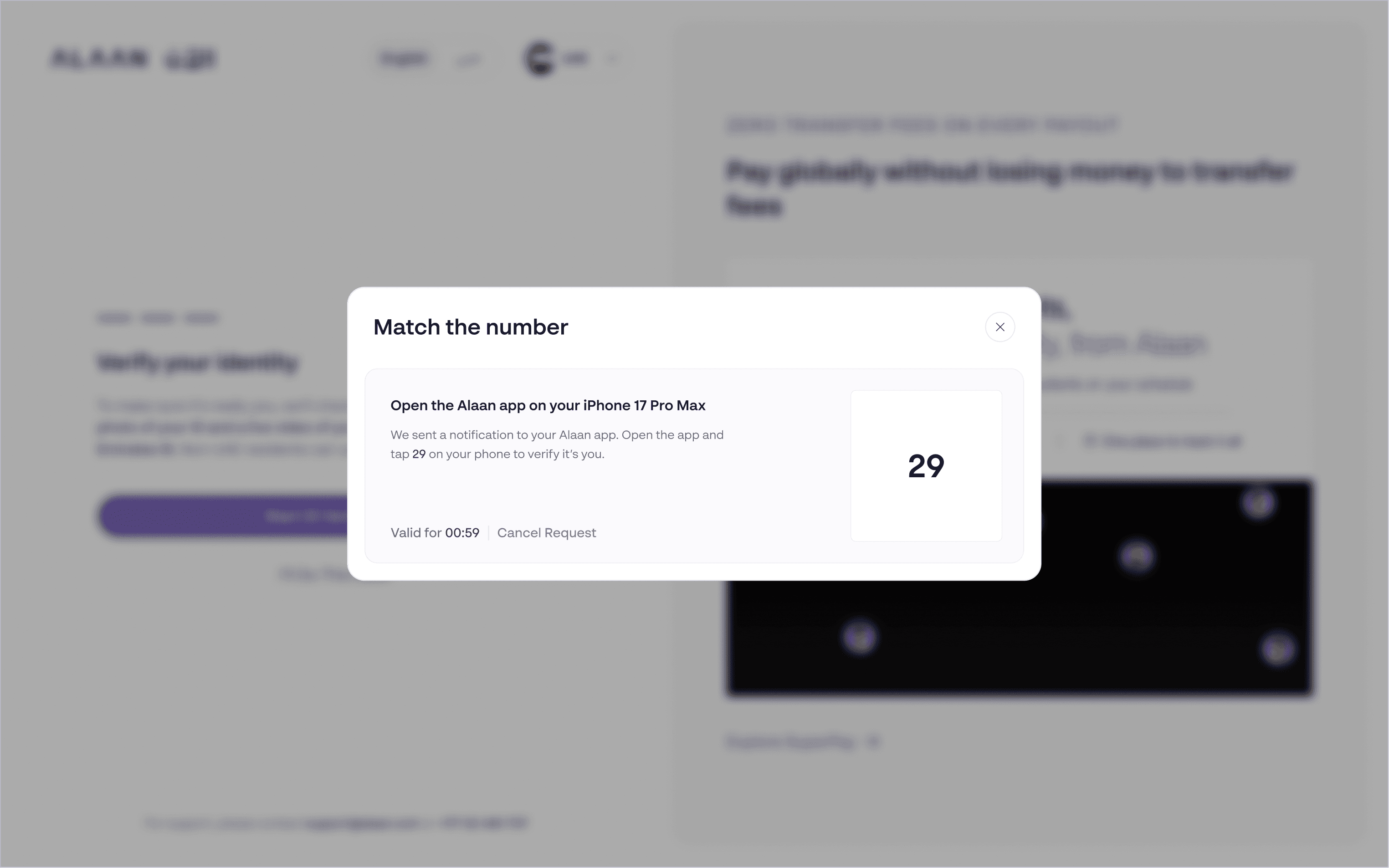
The final layer looks at the moment, not just the person: extra checks when a login looks risky, and explicit approval for card payments.
Authentication decides whether someone gets in. RBAC, covered next, decides what they can do once inside.
The design work: Risk-based login, restricted attempts, account recovery, 3DS in-app OTP and slide-to-approve experiences.
Sessions and trusted devices
“Should this person stay signed in, or verify again?”
On web, we use session expiry to limit how long access stays active and guide users to sign in again when needed.
In the native mobile app, we recognize trusted devices and use biometrics or a passcode for returning access, with additional checks when someone changes phones.
The design work: Web session-timeout and sign-in-again screens, trusted-device flows, and verification when switching or using multiple phones.

Designing for security threats
Phishing
Threat
Attackers impersonate a trusted company to trick people into sharing passwords or one-time codes.
Design response
Removed action buttons from security emails and directed users to open Alaan themselves.
Designed alternate recovery paths for compromised email accounts so users could complete checks when their inbox could no longer be trusted.
BIN Attacks
Threat
Attackers use a card issuer's identification number (BIN) as a starting point, then test combinations of card details to find valid cards.
Design response
Covered in-app OTP and 3DS slide-to-approve journeys.
Centered the experience on reviewing merchant and amount before deliberate approval, making a guessed card number useless without the real cardholder's consent.
Brute force
Threat
Attackers repeatedly guess passwords or verification codes to try to get into an account.
Design response
Added verification and CAPTCHA states within the login flow.
Explained the next check a user needs to complete when access looks risky or a bot signal is detected.
After repeated failures, the account is temporarily frozen; the messaging for this state is the next piece in progress.


Identity verification - Helping users prove who they are
Who needs these checks?
Money-movement roles (MMR): Users with money-movement responsibilities must complete identity verification and a liveness check before the relevant access becomes available.
Non-money-movement roles: Users follow standard setup, with additional verification only where their product or responsibilities require it.
How users complete verification
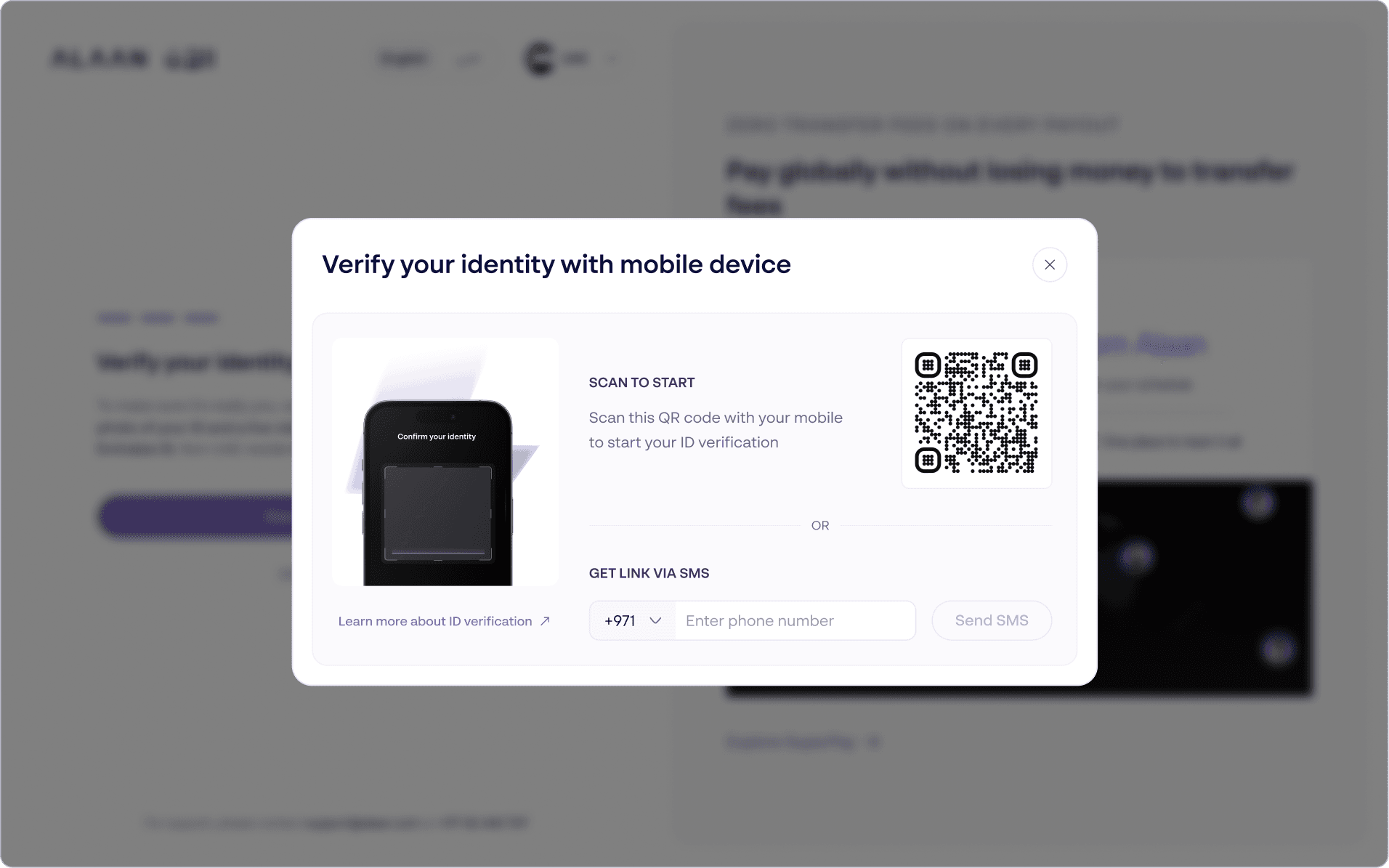
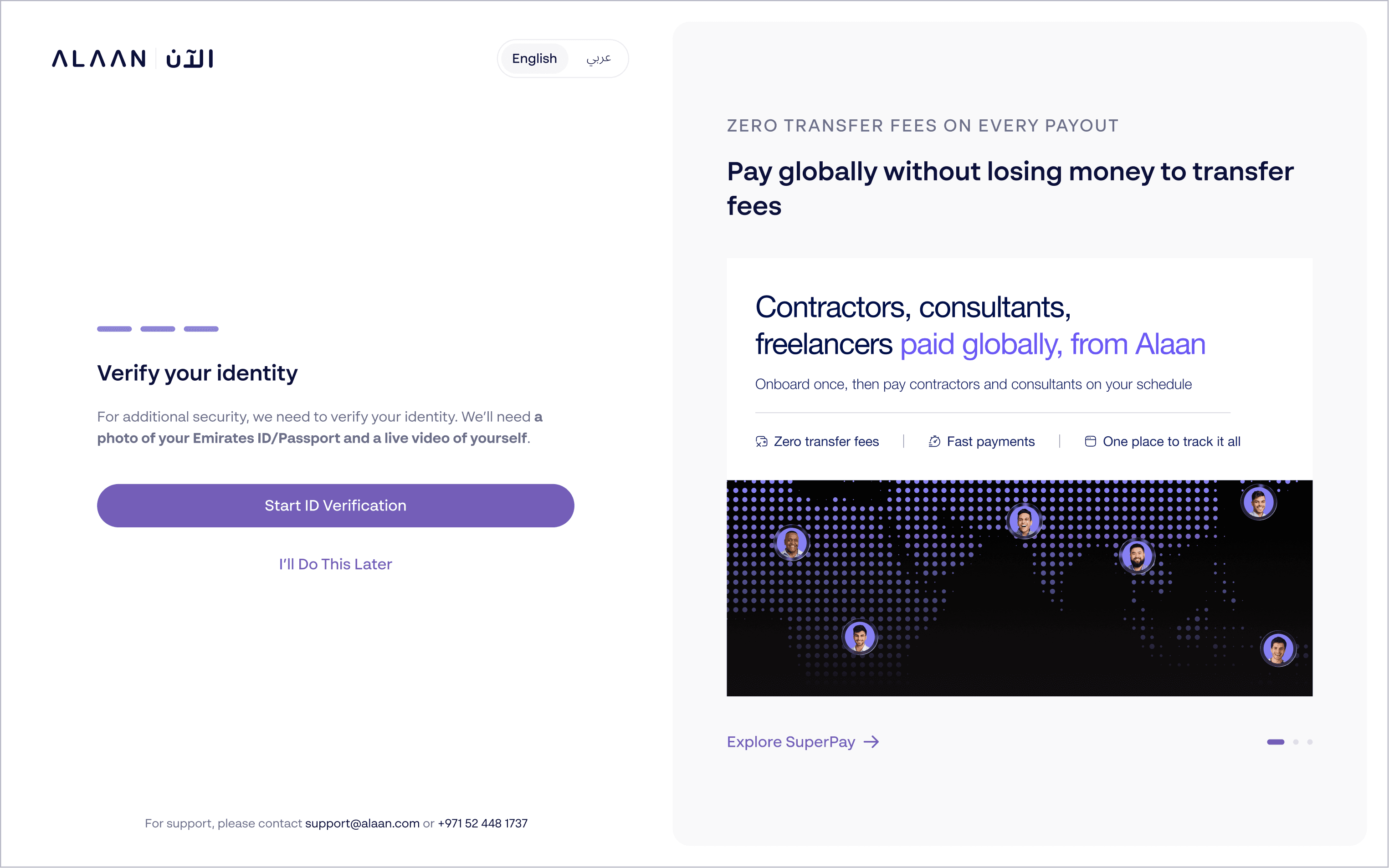
Before verification: Explain why it is needed, what to prepare and how to continue on a supported device.
During verification: Guide users through camera permissions, identity document capture and a face check.
After submission: Show whether verification is complete, under review or needs another attempt, with a clear next step.
For company signatories, there is one more check.
The person completing the business application may not be the person authorized to sign for the company. When they are different people, the signatory receives an invitation to complete their own verification. Ops separately confirms their authority to represent the company.
IDV Liveliness check for authorised signatory


IDENTITY AND USER MANAGEMENT
Who is each user and what can they do?
The right role. The right checks. The right access & permissions
As Alaan added more products, users needed more specific responsibilities and access. I worked on a shared role and permission model that connects each user to their organization, defines which products they can use and makes their allowed actions clear.
Define the role
Make each user’s responsibility clear.
Our earlier model included Admin, Team Leader, Accountant and Cardholder. As the platform expanded, we defined Account Owner, an optional Account Admin and Product Admins, alongside existing team roles, to make responsibility clearer.

Map permissions by product
Make clear what each role can do in each product.
Role-based access control (RBAC) groups allowed actions into roles. Product scope defines where those actions apply. A person managing Cards & Expenses, for example, does not automatically have permission to manage Payroll.
Approving a payment and changing the approval rules are also separate permissions. The model makes these differences explicit.

Make access clear when assigning roles
Help admins understand the access they’re granting
The assignment flow brings the person, role and product access together. Admins can understand what they are granting, review the permissions and see any requirements that must be completed before access becomes active.
The UI is still a WIP
06 · REFLECTION & NEXT STEPS
The deliverable is more than a set of screens.
Adding a role changes more than a dropdown. It can change how someone is invited, what they need to verify, how they recover access and whether they can approve a financial action.
The work connects those journeys through a shared foundation: models that separate identity from responsibility, rules that adapt verification to context, and states that remain understandable across products and CRM/Ops.
The next phase extends this foundation into user management, product-scoped roles and migration for existing customers.
LIVE
What shipped
OTP and recovery journeys
Biometrics and trusted devices
Web session management
Persona IDV + liveness for money-movement roles and signatories
Risk-based login and CAPTCHA
3DS in-app approval
Phishing-safe security emails
ROLLING OUT
What’s next
Product-scoped roles and RBAC assignment
Role change and removal flows
Migration for existing customers
Maker-checker for money movement
Account-freeze messaging
How we’ll measure progress
Can users complete required checks and recover access? Do admins understand the permissions they grant? Can teams introduce new products and roles using the shared foundation? These questions will guide evaluation alongside Security and Risk’s assessment of protection.
APPENDIX · A SHARED VOCABULARY
These terms describe different parts of the system. Keeping them distinct makes both the product and the conversation around it clearer.

Behind the scenes


That's a wrap. Thank you